Out-of-Band Usernameless Authentication
The usernameless authentication scenario follows the same principle as the normal out-of-band authentication use case.
The distinct differences of the usernamelss authentication scenario are:
- The end-user is not required to provide a username during the authentication scenario, as the name suggests.
- The scenario can only be used with either QR codes or links. Push notifications will not work as the backend is lacking the information where to send the push message to.
- The backend is only aware of the user attempting to authenticate after the authentication has been successful.
The usernameless authentication scenario is best used as a non-multistep login flow to provide the end-user the best possible convenience and user experience.
Prerequisites
- The user needs two devices at hand. One device is a laptop, where the user performs a legacy login. The other is a mobile device, where the user authenticates.
- A mobile application is installed on the mobile device. This mobile application handles the FIDO UAF protocol as well QR code scanning.
- The mobile application has to register itself against the backend as the receiver of out-of-band messages. Dispatch Target Management describes this procedure.
- The user has previously registered FIDO Authenticator credentials on his mobile device.
Example with QR Code
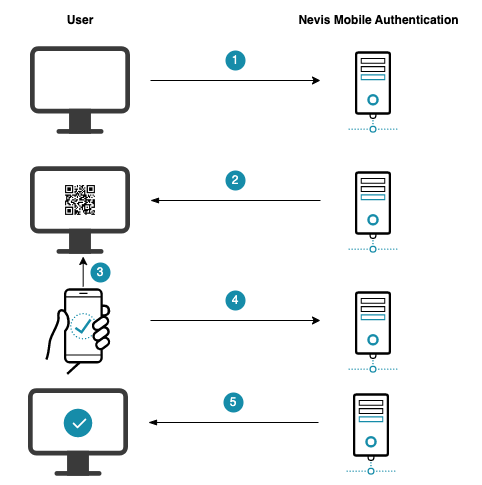
The numbers in the description below correspond with the numbers in the next figure.
- The user opens the e-banking application in the browser on the laptop.
- The e-banking application is protected by Nevis, which renders a login page with a QR code.
- The user scans the QR code using the mobile device.
- The mobile application contacts Nevis to proceed with the FIDO authentication.
- Nevis allows the laptop client to access the e-banking application.
Technical Flow
@startuml

skinparam shadowing false

skinparam BoxPadding 10

skinparam sequence {
    ArrowColor #168CA9
    LifeLineBorderColor #047D82

    ParticipantBorderColor #168CA9
    ParticipantBackgroundColor #168CA9

    ParticipantFontName Frutiger
    ParticipantFontColor white

    ActorBackgroundColor #168CA9
    ActorBorderColor #168CA9
    ActorFontName Frutiger

    GroupBorderColor #168CA9
    GroupBorderThickness 1

    DividerBackgroundColor #168CA9
    DividerBorderColor #168CA9
    DividerBorderThickness 1
    DividerFontColor white
    DividerFontName Frutiger

    BoxBorderColor #168CA9
    BoxBackgroundColor #ECECEC
}

skinparam note {
    FontName Frutiger
    BorderColor #168CA9
    BackgroundColor #F5F5F5
}

title Out-of-Band Usernameless Authentication

actor User as user

box "Desktop Client Device" #F5F5F5
    participant "Browser" as browser #75C3D7
end box

box "Mobile Device" #F5F5F5
 participant "Nevis Access App" as app #75C3D7
end box

box "Nevis Backend" #CDD2D4
    participant nevisProxy as proxy
    participant nevisAuth as auth
    participant nevisFIDO as fido
    participant nevisIDM as idm
end box

participant "Customer Application" as backend #75C3D7

user -> browser: Login
browser -> proxy++: access customer application

proxy -> browser--: Login required (""HTTP 302 /?login"")
browser -> proxy++: Initiate login (""HTTP GET /?login"")
proxy -> browser--: render login page

autonumber

browser -> proxy++: HTTP POST ""{"dispatcher":"png-qr-code"}""
rnote over proxy #F5F5F5
    IdentityCreationFilter
end note
proxy -> auth++: authenticate

rnote over auth #F5F5F5
    OutOfBandFidoUafAuthState
end note

group HTTP API: Dispatch Token Service
  auth -> fido++: POST ""token/dispatch/authentication"" \n ""dispatcher" : "png-qr-code"""
  fido -> fido: Generate ""token"" and\nstore ""GetUafRequest""
  fido -> auth--: Dispatch token response\n(sessionId)
end group

auth -> auth: Cache ""sessionId""

auth -> proxy--: Token dispatched (""DispatchTokenResponse"") \n QR Code information
proxy -> browser--:\n Render QR Code

loop
    browser -> auth++ : query status with ""sessionId""

    rnote over auth #ECECEC
        OutOfBandFidoUafAuthState
    end note

    group HTTP API: Status Service
      auth -> fido++: StatusRequest
      auth <- fido--: ""tokenCreated""
    end group

    browser <- auth-- : Authentication status: ""tokenCreated""

    note right
    The value returned can be one of the following
    according to the current authentication status:
    ""tokenCreated"", ""clientAuthenticating"", ""succeeded""
    end note
end

user -> app++: open Access App
user -> app: scan QR code

group HTTP API: Redeem Token Service
  app -> fido++: POST ""/token/redeem/authentication"" (""token"")
  fido -> app--: ""uafRequest""
end group

app -> user: Query credentials
user -> app: Supply credentials

group HTTP API: Authentication Response Service
  app -> fido++: POST ""uaf/1.1/authentication"" (""uafResponse"")
  fido -> app--: Server response
end group

app -> user--: Authentication successful

browser -> auth++ : query status with ""sessionId""

rnote over auth #ECECEC
    OutOfBandFidoUafAuthState
end note

group HTTP API: Status Service
  auth -> fido++: StatusRequest
  auth <- fido--: ""succeeded""
end group


auth -> auth: Auth state transition

rnote over auth #ECECEC
    IdmUserVerifyState
end note


auth -> idm++: load user information
idm -> auth--: user information

auth -> auth: AUTH_DONE
rnote over proxy #F5F5F5
    IdentityCreationFilter
end note
auth -> proxy--++: Create authenticated session
proxy -> browser--: HTTP Redirect
browser -> proxy: HTTP GET initial request

proxy -> backend: Forward to relying party application

|||
@enduml
The numbers in the list correlate with the step numbers in the previous figure.
The client javascript in the browser starts the authentication operation by sending a dispatch token request to the backend.
The supported dispatchers for usernameless authentication are Link or QR-Code.
The nevisProxy IdentityCreationFilter forwards the request to the nevisAuth OutOfBandFidoUafAuthState.
The auth state starts the authentication by requesting a dispatch token from nevisFIDO using the Dispatch Token Service.
nevisFIDO creates the token and stores the
GetUafRequestobtained by nevisAuth for later redemption by the Access App.nevisFIDO returns the Dispatch Token Response to nevisAuth.
nevisAuth caches the operations
sessionIdto track the authentication status through the operation.nevisAuth forwards the response to nevisProxy. The response contains the information to render the QR code or display a link.
nevisProxy renders the QR code information or displays a link in the Browser and displays it to the user.
The client JavaScript starts querying the progress of the authentication repeatedly.
The
OutOfBandFidoUafAuthStateuses the suppliedsessionIdto query the nevisFIDO Status Service.The Status Service returns the current status of the authentication operation.
nevisAuth reports the status back to the browser to inform the user.
The user opens the Nevis Access App.
The user scans the QR code displayed or clicks the link rendered in the browser.
The Nevis Access App uses the Redeem Token Endpoint in nevisFIDO to obtain the UAF Request to process the authentication operation.
nevisFIDO returns the UAF Request to the Nevis Access App.
As part of the authentication, the Nevis Access App queries the user for previously enrolled credentials.
The user supplies an enrolled credential.
The Nevis Access App signs the authentication challenge and posts the UAF Response to the nevisFIDO Authentication Response Service.
nevisFIDO reports the operation result back to the Nevis Access App. In this scenario, valid credentials are provided and the authentication operation succeeds.
The Nevis Access App informs the user about the successful authentication operation.
After this step, the status check loop executed in the browser by the JavaScript will receive a different status response. This call will lead the authentication flow to continue in nevisAuth.
The
OutOfBandFidoUafAuthStatequeries the nevisFIDO Status Service again.The result received from the Status Service indicates the authentication operation was successful by responding with
succeeded.The
OutOfBandFidoUafAuthStatestarts theoktransition, in this example leading the auth engine to transition to theIdmUserVerifyState.The
IdmUserVerifyStateuses the userId provided in the request object:${request:userId}.The auth states load additional user information from nevisIDM.
The auth engine reaches AUTH_DONE.
nevisProxy is informed to create an authenticated session.
nevisProxy issues a redirect towards the Browser.
The browser accesses the original relying party URL.
nevisProxy forwards the authenticated request to the customer application.
How does it work?
Usernameless authentication may sound strange as the user is never asked to provide a login identifier and is able to authenticate by simply providing his or her authentication credentials. This chapter provides a simplified explanation of how the scenario works.
- When providing a QR code, the backend does not need to be aware of the user wanting to authenticate. Essentially, the backend poses a challenge which must be successfully signed, only specifying what is accepted to sign the challenge. In the FIDO UAF context, this is a list of allowed authenticators identified by the FIDO UAF Policy.
- By signing the challenge with a known and enrolled authenticator, the backend is able to identify the user who signed the challenge based on the unique authenticator credential ID contained in the UAF Response sent back to the server.
- The server looks up the credential used to sign the challenge and based on this is able to locate the user possessing the signing credential.