In-Band Authentication
Description
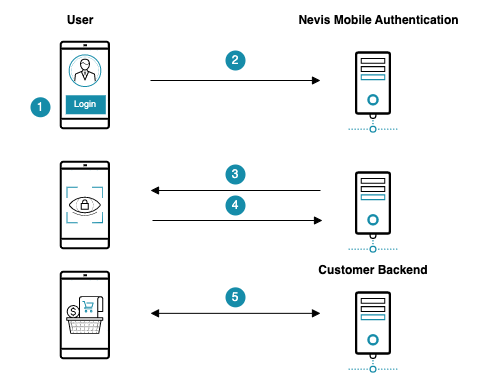
A user is trying to access an HTTP application, for example an e-banking application, which requires authentication. The user must provide the required authentication with his mobile device. The security requirements of the HTTP application define the nature of the authentication (for example, fingerprint, PIN/password, face recognition, or a combination of several authentication mechanisms). It is assumed that the user's client application has FIDO capabilities, that is, it must contain an embedded FIDO Client with access to one or several FIDO Authenticators. Furthermore, the HTTP application is protected by Nevis (notably nevisProxy and nevisAuth).
Example
- The user launches the e-banking application on the mobile device.
- The mobile client application tries to access the e-banking web server to retrieve the account statement of the user.
- Nevis detects that the mobile client application is not authenticated. It asks the user to provide authentication that meets the security policy of the e-banking application. In this example, this is a fingerprint-based authentication.
- The user authenticates using the fingerprint-based FIDO Authenticator in the mobile device.
- The mobile client application can now access the e-banking web server. The account statement is displayed in the mobile application.
Technical Flow
The technical flow in the following figure explains the component interaction in detail. The numbers of the steps in the next figure do not correlate with the simplified example above.
It is assumed that the user has already registered FIDO credentials. These FIDO credentials are located in the nevisFIDO server on the mobile device containing the e-banking mobile application. See the In-Band Registration use case for details regarding registration. It is also assumed that only one user is using the application on the mobile device, that is, the device is not shared between different users. Another assumption is that the policy requires the use of a fingerprint-based authenticator.
@startuml

skinparam shadowing false
skinparam BoxPadding 10
skinparam sequence {
    ArrowColor #168CA9
    LifeLineBorderColor #047D82
    ParticipantBorderColor #168CA9
    ParticipantBackgroundColor #168CA9
    ParticipantFontName Frutiger
    ParticipantFontColor white
    ActorBackgroundColor #168CA9
    ActorBorderColor #168CA9
    ActorFontName Frutiger
    GroupBorderColor #168CA9
    GroupBorderThickness 1
    DividerBackgroundColor #168CA9
    DividerBorderColor #168CA9
    DividerBorderThickness 1
    DividerFontColor white
    DividerFontName Frutiger
    BoxBorderColor #168CA9
    BoxBackgroundColor #ECECEC
}
skinparam note {
    FontName Frutiger
    BorderColor #168CA9
    BackgroundColor #F5F5F5
}

title In-Band Authentication

actor User as user

box "Mobile Device" #F5F5F5
 participant "FIDO UAF \n Authenticator" as authenticator #75C3D7
 participant "Nevis Access App" as app #75C3D7
end box

box "Nevis Backend"
    participant nevisProxy as proxy
    participant nevisAuth as auth
    participant nevisFIDO as fido
    participant nevisIDM as idm
end box

participant "Customer Application" as backend #75C3D7

autonumber
user -> app++: Open and use Mobile App

== Initialise Authentication ==

app -> proxy++: Access /auth/fidouaf
proxy -> auth--++: Authentication required

rnote over auth #ECECEC
    FidoUafAuthState
end note

group HTTP API: Authentication Request Service
    auth -> fido++: ""GetUAFRequest""
end group

hnote over fido
    policy <size:20><&document></size>
end note
fido --> auth--: ""ReturnUAFRequest""\n(""AuthenticationRequest"")
auth --> app--: Forward ""ReturnUAFRequest""\n(""AuthenticationRequest"")

== Trusted Facets ==

group HTTP API: Facets Service
    app -> proxy++: Fetch trusted facets
    proxy -> fido--++: Forward trusted facets request
end group
fido --> app--: ""TrustedFacets""

== Client processing ==

app -> authenticator++: Trigger user authentication
authenticator -> user++: Authenticate
user --> authenticator--: Unlock private key

hnote over authenticator
    private <size:20><color:red><&key></color></size>
end note
authenticator --> app--: Assertion

== Authentication Response ==

group HTTP API: Authentication Response Service
    app -> proxy++: ""SendUAFResponse""\n(""AuthenticationResponse"")
    proxy -> fido--++: Forward ""SendUAFResponse""\n(""AuthenticationResponse"")
end group

fido -> idm++: Fetch FIDO credential
idm --> fido--: Credential
hnote over fido
    public <size:20><color:green><&key></color></size>
    policy <size:20><&document></size>
    metadata <size:20><&document></size>
end note
fido --> app--: ""ServerResponse""

== Finalise Authentication ==

app -> proxy++: Check authentication status \n(""fidoUafSessionId"")
proxy -> auth++: Check authentication status \n(""fidoUafSessionId"")

rnote over auth #ECECEC
    FidoUafAuthState
end note

group HTTP API: Status Service
 auth -> fido++: Query authentication status
end group

fido --> auth--: Authentication Status\n(""StatusResponse"")  """succeeded"""

note right
 The flow will fail if one of the following two statuses is reported:
 - failed
 - unknown
end note

auth --> proxy--: Authentication Status\n(""StatusResponse"")  """succeeded"""
proxy --> app--: Authentication Status\n(""StatusResponse"")  """succeeded"""

== Generate SecToken ==

app -> proxy++: Check authentication status \n(""fidoUafSessionId"")
proxy -> auth++: Check authentication status \n(""fidoUafSessionId"")

rnote over auth #ECECEC
    FidoUafAuthState
end note
auth -> auth: Transition """ok"""

rnote over auth #ECECEC
    DirectResponseState
end note

auth -> auth: Set response payload JSON: \n""{"status":"completed"}""
auth -> auth: Set response to AUTH_DONE

auth --> proxy--: ""{"status":"completed"}"" + ""SecToken""
proxy --> app--: ""{"status":"completed"}""\n(<color:red>""cookie""</color>)

== Access Relying Party Services ==

app -> proxy++: Access Relying Party service\n(<color:red>""cookie""</color>)
autonumber stop
proxy -> backend--++: Providing access to Relying Party service
backend --> app--
app --> user--
|||

@enduml
The numbers in the list correlate with the step numbers in the previous figure.
The user opens the e-banking application on the mobile device to see her actual account statement.
The mobile application initiates the in-band authentication by accessing the respective endpoint
As the perimeter component of Nevis Mobile Authentication, nevisProxy receives the incoming request.
Endpoint:
https://<nevisProxy-host>:<nevisProxy-port>/auth/fidouafReferences:
nevisProxy detects that the mobile client application is not authenticated.
nevisProxy redirects the client to nevisAuth to ask for authentication.
nevisAuth is configured for authentication with FIDO UAF. To achieve this, nevisFIDO provides an own AuthState named
FidoUafAuthState.The
FidoUafAuthStateassembles aGetUAFRequest(with the operation header set toAuth). nevisAuth sends theGetUAFRequestto nevisFIDO, to trigger a FIDO UAF authentication.Endpoint:
https://<nevisFIDO-host>:<nevisFIDO-port>/nevisfido/uaf/1.1/request/authenticationReferences:
nevisFIDO sends a
ReturnUAFRequestto nevisAuth. TheReturnUAFRequestcontains anAuthenticationRequestmessage including the authentication policy.nevisFIDO also returns a FIDO UAF session identifier. For more information, see Authentication Request Service in the nevisFIDO Reference Guide, in particular the "Example Response" part. This part describes the proprietary extension containing the FIDO UAF session ID.
infoPlacing the
fidoUafSessionIdin the extension part of theAuthenticationRequestmakes synchronisation between nevisAuth and nevisFIDO possible: It links the FIDO session maintained in nevisFIDO to the session maintained by nevisAuth.References:
nevisAuth forwards the
ReturnUAFRequestto the mobile device through nevisProxy. It is assumed that the mobile device includes an embedded FIDO Client.While forwarding the
ReturnUAFRequest, nevisAuth looks into the containedAuthenticationRequestmessage and stores the found FIDO UAF session identifier. However, nevisAuth does not change the content of the message.References:
The embedded FIDO Client fetches the trusted facets.
The request will be sent to nevisProxy.
The information accessible at the Facets Service endpoint helps the e-banking mobile application to identify whether it is an authorized facet of the e-banking web application.
Endpoint:
https://<nevisProxy-host>:<nevisProxy-port>/nevisfido/uaf/1.1/facetsinfoThis endpoint is an example of mapping nevisProxy to the nevisFIDO Facets Service endpoint
nevisProxy forwards the request to nevisFIDO.
Endpoint:
https://<nevisFIDO-host>:<nevisFIDO-port>/nevisfido/uaf/1.1/facetsReferences:
nevisFIDO returns the trusted facets it maintains. nevisProxy forwards them to the FIDO Client.
References:
The FIDO Client triggers the user authentication at the matching FIDO Authenticator.
The FIDO Client can find a matching FIDO Authenticator on the mobile device by using the policy received via the AuthenticationRequest message in step 6.
The fingerprint-based FIDO Authenticator initiates the client-side authentication of the user.
The GUI of the mobile platform informs the user to authenticate by tapping the fingerprint sensor of the mobile device.
With a successful fingerprint-based authentication the user enables the usage of the private key. This private key matches the formerly registered FIDO credentials of the e-banking web application. The private key is now unlocked inside the FIDO Authenticator for signing purposes.
As the outcome of the user authentication, the FIDO Authenticator assembles and returns an AuthenticatorSignAssertion to the FIDO Client. The assertion is signed by the private key of the user, as proof of the successful client-side authentication.
infoThe private key that is used to sign the assertion never leaves the FIDO Authenticator. This means that neither the embedded FIDO Client nor the Relying Party mobile app can access it directly (not even in an unlocked state).
Because the
AuthenticatorSignAssertionis digitally signed, none of the involved parties in the communication chain can change the assertion without violating any upcoming integrity checks.References:
The Relying Party mobile app sends a
SendUAFResponseto the Authentication Response Service endpoint defined in nevisProxy.The
SendUAFResponsecontains anAuthenticationResponsemessage including theAuthenticatorSignAssertionprovided by the FIDO Authenticator in the previous step (13).Endpoint:
https://<nevisProxy-host>:<nevisProxy-port>/auth/fidouaf/authenticationresponse/infoSince this endpoint is not a direct match to the nevisFIDO Authentication Response Service endpoint, it should be mapped with a custom connector servlet and servlet-mapping in nevisProxy:
Authentication Response custom servlet and mapping<servlet>
<servlet-name>Connector_AuthenticationResponse</servlet-name>
<servlet-class>ch::nevis::isiweb4::servlet::connector::http::HttpsConnectorServlet</servlet-class>
<init-param>
<param-name>AutoRewrite</param-name>
<param-value>off</param-value>
</init-param>
<init-param>
<param-name>InetAddress</param-name>
<param-value>localhost:9443</param-value>
</init-param>
<init-param>
<param-name>MappingType</param-name>
<param-value>pathinfo</param-value>
</init-param>
<init-param>
<param-name>URIPrefix</param-name>
<param-value>/nevisfido/uaf/1.1/authentication</param-value>
</init-param>
</servlet>
<servlet-mapping>
<servlet-name>Connector_AuthenticationResponse</servlet-name>
<url-pattern>/auth/fidouaf/authenticationresponse/</url-pattern>
</servlet-mapping>References:
nevisProxy forwards the SendUAFResponse to nevisFIDO.
Endpoint:
https://<nevisFIDO-host>:<nevisFIDO-port>/nevisfido/uaf/1.1/authenticationReferences:
nevisFIDO fetches the user's FIDO credential from nevisIDM. The credential contains the public key material that the FIDO Authenticator generated exclusively for this e-banking application and user during the registration.
You can uniquely identify and fetch the credential by the "username/AppId/AAID/KeyId" quadruple.
nevisIDM returns the FIDO credential to nevisFIDO.
nevisFIDO validates the AuthenticationResponse, including the
AuthenticatorSignAssertion.nevisFIDO verifies the signature - and thus the integrity - of the
AuthenticatorSignAssertion, with the public key from the related FIDO credential.In addition to the policy, nevisFIDO also uses the metadata stored locally on the server to validate the response. The metadata information must contain a descriptor of the FIDO Authenticator model used to perform the authentication.
References:
nevisFIDO returns a
ServerResponseto the Relying Party mobile app through nevisProxy, informing that the authentication was successful.infoWhen nevisFIDO returns the
ServerResponse, you can consider the FIDO operation as completed. For authenticating purposes, however, Nevis Mobile Authentication must further consult nevisAuth.References
The mobile application provides the FIDO UAF session ID generated in step 5. This is required to trigger a synchronisation between nevisAuth and nevisFIDO.
Endpoint:
https://<nevisProxy-host>:<nevisProxy-port>/auth/fidouafnevisProxy detects that the mobile application is not yet authenticated.
nevisProxy forwards the request with the FIDO UAF session ID to nevisAuth.
Endpoint:
https://<nevisAuth-host>:<nevisAuth-port>/nevisauth/services/AuthenticationServiceReferences
nevisAuth queries nevisFIDO regarding the authentication status.
nevisAuth verifies that the FIDO UAF session ID is the one stored in step 6. It sends the FIDO UAF session ID to the status service of nevisFIDO.
Endpoint:
https://<nevisFIDO-host>:<nevisFIDO-port>/nevisfido/statusReferences
nevisFIDO confirms to nevisAuth that the authentication for the provided FIDO UAF session ID was successful.
References
nevisAuth forwards the
statusResponseobtained from nevisFIDO to nevisProxy.nevisProxy forwards the
statusResponseto the mobile application.Although the authentication is considered completed, the session has not yet been marked as authenticated. This is because the nevisAuth flow is not completed yet.
To complete the authentication flow, the mobile application re-sends the request containing the FIDO UAF session ID.
Endpoint:
https://<nevisProxy-host>:<nevisProxy-port>/auth/fidouafnevisProxy forwards the request with the FIDO UAF session ID to nevisAuth.
Since the authentication was successful, nevisAuth will transition to the next configured AuthState with the "ok" transition.
Here, the
DirectResponseStateis configured as the next AuthState after theFidoUafAuthState.The next AuthState
DirectResponseStatesets the direct response payload to a static JSON containing:{"status":"completed"}The next AuthState,
DirectResponseState, also sets the response toAUTH_DONE. It thus marks the authentication flow as complete.With the result set to
AUTH_DONE, a SecToken is generated. Furthermore, the session is marked as authenticated.The mobile application receives the static JSON payload alongside a cookie. Both indicate that the session is now authenticated.
The mobile application can now access the services of the e-banking web server and display the account statement of the user.
The cookie is used by nevisProxy to check that the application is authenticated.
Multiple Users in Device
In some cases, the device used to access the web application might be shared between different users. This may be the case, for example, for a company using proprietary hardware with an embedded FIDO Authenticator and a limited number of devices. In this scenario, it is useful to identify the user trying to authenticate beforehand. You can achieve this with FIDO step-up authentication.
In this use case, nevisFIDO is aware of the user trying to authenticate. This allows nevisFIDO to limit the allowed FIDO UAF Authenticators to those registered by this user, and to send a list with only those authenticators to the FIDO UAF client. The client can then determine which FIDO Authenticators to use for authentication without interacting with the user.
It is possible to configure the FidoUafAuthState in nevisAuth to define the username (if any) to be sent to nevisFIDO.
You do this with the fidoUafUsername property:
<AuthState name="FidoUafAuthState" class="ch.nevis.auth.fido.uaf.authstate.FidoUafAuthState" final="false"
           resumeState="false">
    <ResultCond name="ok" next="AuthDone"/>
    <ResultCond name="error" next="AuthError"/>
    <ResultCond name="failed" next="AuthError"/>
    <property name="fidoUafServerUrl" value="https://localhost:8443"/>
    <property name="httpclient.tls.truststoreRef" value="DefaultKeyStore"/>
    <property name="fidoUafUsername" value="${notes:username}"/>
</AuthState>
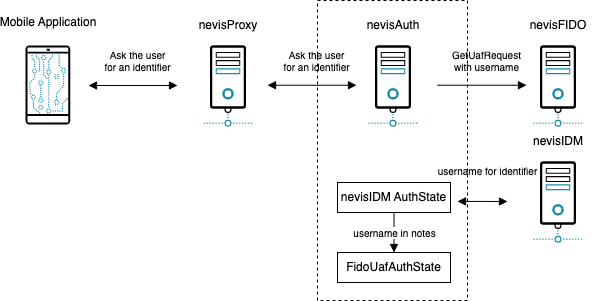
In the example above, the username is retrieved from the notes stored in the nevisAuth session. The notes can be stored by a previously executed AuthState. nevisFIDO uses nevisIDM to store FIDO credentials, and the extId of the user is the username. The previously executed AuthState could interact with the user to retrieve an identifier; the main task of the AuthState would be to retrieve the username (extId) from nevisIDM using this identifier. The following diagram describes this process:
Another possibility is to retrieve the username at the client level. The application could send the username in the request. For example, if the fidoUafUserName property of the FidoUafAuthState is configured as follows:
<property name="fidoUafUsername" value="${inargs:o.username.v}"/>
The mobile client could send the username (again the extId of the user in nevisIDM) in the first step of the authentication using JSON:
{
  "username": "the_user_name"
}
If the application has an identifier of the user other than the extId, you could use the same approach as above. However, you do not need to interact with the user, because in this case the identifier is provided by the application.
Configuration Snippets
You will find example configuration snippets for all involved components in Nevis Component Configuration Examples.