Out-of-Band Authentication
Description
Out-of-band authentication allows users to authenticate on their mobile phones. Thus, a user can authorize sessions on different devices. For example, the user gains access to the e-banking application on his laptop by authenticating via the fingerprint reader on his mobile phone.
Prerequisites
- The user must have two devices at hand. One device is a laptop, where the user must perform a legacy login. The other is a mobile device, where the user authenticates.
- A mobile application is installed on the mobile device. This mobile application must be able to handle the FIDO UAF protocol as well as push notifications.
- The mobile application has to register itself against the backend as the receiver of out-of-band messages. Dispatch Target Management describes this procedure.
- The user has previously registered FIDO Authenticator credentials on his mobile device. Registration can be done via In-Band Registration.
Example with Push Notification
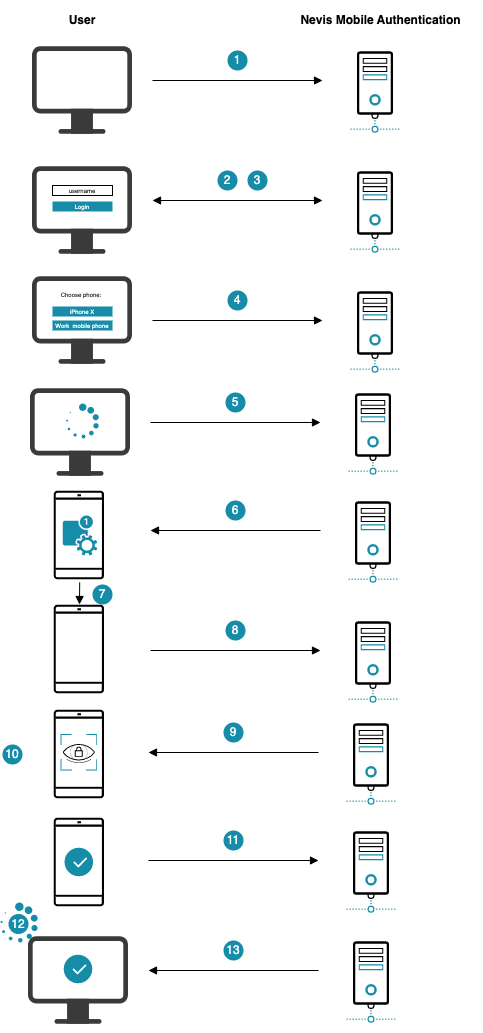
The numbers in the description below correspond with the numbers in the next figure.
- The user opens the e-banking application in the browser on the laptop.
- The e-banking application is protected by Nevis, which renders a login page and asks for a username.
- The user provides his username.
- Now Nevis renders a page in which the user must specify the mobile device to be used for authentication.
- The user selects the mobile device to be used for authentication.
- Nevis sends a push notification to the selected mobile device.
- The user receives a push notification on the mobile device and taps it.
- The mobile application receives the push message and contacts Nevis to proceed with the FIDO authentication.
- Nevis now requests the mobile device to authenticate.
- The user performs an In-Band Authentication using the fingerprint-based FIDO Authenticator in the mobile device.
- The user completes the authentication process on the mobile device.
- Meanwhile, the client on the laptop frequently checks Nevis about the status of the user's authentication. When the user has successfully authenticated on the mobile device, the laptop client takes over again.
- Nevis allows the laptop client to access the e-banking application.
Channel Linking
The channel linking mechanism allows the end user to verify the link between devices that participate in out-of-band authentication. Currently, the visual string channel linking is the only channel linking method supported out-of-the box by Nevis Mobile Authentication.
This is how it works: The system generates a random string in the backend and sends the string to both devices used for the out-of-band authentication. Each device shows the string to the end user. The end user must confirm that the same string is presented on both devices.
The following figure illustrates the process:
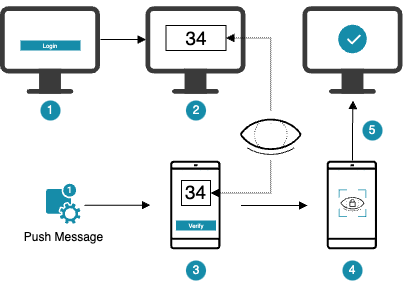
- The user provides the login credentials
- A random character string is displayed on the desktop screen
- The Nevis Access App receives the authentication push message
- The same character text is displayed in the Nevis Access App, the user can confirm or opt-out
- Upon confirmation, the user is logged in
The visual string channel linking in Nevis Mobile Authentication is configured in the OutOfBandFidoUafAuthState. For more details, check the nevisFIDO Reference Guide, in particular the Channel Linking section of the OutOfBandFidoUafAuthState chapter.
The Nevis Access App supports this concept with a specific feature called number matching.
Out-Of-Band Mechanisms
One way of transferring authentication information to the mobile device is by means of the Firebase Cloud Messaging service (short FCM service). The example in the technical flow section below, for instance, shows how nevisFIDO uses the FCM service to transfer the required authentication information to the user's mobile device via a push notification. An alternative option to transfer authentication information to the mobile device is a QR code. A second alternative is a link that can be used to open the authentication application. This is a suitable option when the web browser runs in the mobile device. Nevis Mobile Authentication provides both alternatives.
You can use these different out-of-band mechanisms on their own or as a fallback for the other mechanism. It may happen, for example, that the FCM service fails because of a temporary network problem between nevisFIDO and the FCM service. In such a case, you can use the QR code approach as a fallback.
For more details, check the Dispatching for Out-of-Band Operations - Push Notification Fallback in this guide and the Authentication Retry/Fallback Example section of the OutOfBandFidoUafAuthState chapter in the nevisFIDO Reference Guide.
Technical Flow
The technical flow in the next figure explains the component interaction in detail. The step numbers in the figure do not correlate with the simplified example above.
@startuml

skinparam shadowing false
skinparam BoxPadding 10
skinparam sequence {
    ArrowColor #168CA9
    LifeLineBorderColor #047D82
    ParticipantBorderColor #168CA9
    ParticipantBackgroundColor #168CA9
    ParticipantFontName Frutiger
    ParticipantFontColor white
    ActorBackgroundColor #168CA9
    ActorBorderColor #168CA9
    ActorFontName Frutiger
    GroupBorderColor #168CA9
    GroupBorderThickness 1
    DividerBackgroundColor #168CA9
    DividerBorderColor #168CA9
    DividerBorderThickness 1
    DividerFontColor white
    DividerFontName Frutiger
    BoxBorderColor #168CA9
    BoxBackgroundColor #ECECEC
}
skinparam note {
    FontName Frutiger
    BorderColor #168CA9
    BackgroundColor #F5F5F5
}

title Out-of-Band Authentication

actor User

box "Desktop Device" #F5F5F5
    participant "Browser" as browser #75C3D7
end box

box "Mobile Client Device" #F5F5F5
 participant "FIDO UAF \nAuthenticator" as Authenticator #75C3D7
 participant "Nevis Access App" as app #75C3D7
end box

box "Nevis Backend"
    participant nevisProxy as proxy
    participant nevisAuth as auth
    participant nevisFIDO as fido
    participant nevisIDM as idm
end box

participant "Customer Application" as backend #75C3D7
participant "Firebase Cloud Messaging\n(FCM)" as FCM #75C3D7

autonumber
User -> browser ++ : Open browser app
browser -> proxy : Access relying party service

== Initialize Login ==
browser <-- proxy: Login required (""HTTP 302 /?login"")
browser -> auth ++ : Initiate login (""HTTP GET /?login"")
autonumber stop
browser <-- auth --: Login form

== Dispatch Target Determination==

autonumber resume
User -> browser: Provide username
browser -> proxy : POST login form (""username"")
autonumber stop
proxy -> auth ++ : forward ""username""

autonumber resume
rnote over auth #ECECEC
    IdmUserVerifyState
end note
auth -> idm ++ : Fetch user\n(""username"")
autonumber stop
auth <-- idm --
rnote over auth #ECECEC
    OutOfBandFidoUafAuthState
end note
autonumber resume

group HTTP API: Query Dispatch Target
    auth -> fido ++ : Query dispatch target\n(""username"")
end group
fido -> idm ++ : Find dispatch targets\n(""userId"")
autonumber stop
fido <-- idm -- : Dispatch target(s)
auth <-- fido -- : ""dispatchTargets[]""
proxy <-- auth -- : ""dispatchTargets[]""
browser <-- proxy -- : ""dispatchTargets[]""

alt Multiple dispatch target
autonumber resume
User -> browser: Select dispatch target
end

== Dispatch Token ==

browser -> proxy : Initiate token dispatch (""dispatchTargetId"")
autonumber stop
proxy -> auth ++ : forward ""dispatchTargetId""
autonumber resume
rnote over auth #ECECEC
    OutOfBandFidoUafAuthState
end note
auth -> auth: Create ""GetUafRequest""\n(""username"")

group HTTP API: Dispatch Token Service
    auth -> fido ++ : Dispatch token request\n(""dispatchTargetId,""\n""GetUafRequest,""\n""Channel Linking Information"")
end group

fido -> fido: Generate ""token"" and\nstore ""GetUafRequest""
fido -> idm ++ : Fetch dispatch target\n(""dispatchTargetId"")
autonumber stop
fido <-- idm -- : Dispatch target
hnote over fido
    dispatch target
    public <size:20><color:green><&key></color></size>
end note
autonumber resume
fido -> fido: Encrypt data using JWE\n(""token,redeemUrl"")
FCM <- fido ++ : Transmit push message
autonumber stop
FCM --> fido --
autonumber resume
auth <-- fido: Dispatch token response\n(sessionId)
auth -> auth: Cache ""sessionId""

autonumber stop
proxy <-- auth -- : Token dispatched (""DispatchTokenResponse,""\n""Channel Linking Information"")
autonumber resume
browser <-- proxy -- : Token dispatched (""DispatchTokenResponse,""\n""Channel Linking Information"")

loop
    browser -> proxy : Status service\n(""sessionId"")
    autonumber stop
    proxy -> auth ++ : forward ""sessionId""
    autonumber resume
    rnote over auth #ECECEC
        OutOfBandFidoUafAuthState
    end note

    group HTTP API: Status Service
        auth -> fido: StatusRequest
    end group
    autonumber stop
    auth <-- fido: ""tokenCreated""
    proxy <-- auth -- : Authentication status: ""tokenCreated""
    autonumber resume
    browser <-- proxy -- : Authentication status: ""tokenCreated""
end

app <- FCM ++ : Push message
hnote over app
    dispatch target
    private <size:20><color:red><&key></color></size>
end note
app -> app: Decrypt JWE

== Redeem Authentication Token ==

group HTTP API: Redeem Token Service
    app -> proxy: Redeem authentication token\n(""token"")
    autonumber stop
    proxy -> fido: Redeem authentication token\n(""token"")
    autonumber resume
end group

fido -> fido: Fetch ""GetUafRequest""\nfrom session
hnote over fido
    policy <size:20><&document></size>
end note
app <-- fido: ""ReturnUAFRequest""\n(""AuthenticationRequest"")

loop
    browser -> proxy: Status service\n(""sessionId"")
    autonumber stop
    proxy -> auth ++ : forward ""sessionId""
    autonumber resume
    rnote over auth #ECECEC
        OutOfBandFidoUafAuthState
    end note

    group HTTP API: Status Service
        auth -> fido: StatusRequest
    end group

    autonumber stop
    auth <-- fido : ""clientAuthenticating""
    proxy <-- auth -- : Authentication status: ""clientAuthenticating""
    autonumber resume
    browser <-- proxy: Authentication status: ""clientAuthenticating""
end

== Trusted facets ==

group HTTP API: Facets Service
    app -> proxy: Fetch trusted facets
    proxy -> fido: Forward trusted facets request
end group
autonumber stop
proxy <-- fido: Trusted facets
app <-- proxy: Trusted facets

== Out-of-Band Authentication ==

autonumber resume
Authenticator <- app ++ : Trigger user authentication
User <- Authenticator ++ : Authenticate
autonumber stop
User --> Authenticator -- : Unlock private key
hnote over Authenticator
    private <size:20><color:red><&key></color></size>
end note
autonumber resume
Authenticator --> app -- : ""Assertion""


group HTTP API: Authentication Response Service
    app -> proxy: ""SendUAFResponse""\n(""AuthenticationResponse"")
    proxy -> fido: Forward ""SendUAFResponse""\n(""AuthenticationResponse"")
end group

fido -> idm ++: Fetch FIDO credential
autonumber stop
fido <-- idm --: Credential
hnote over fido
    public <size:20><color:green><&key></color></size>
    policy <size:20><&document></size>
    metadata <size:20><&document></size>
end note
proxy <-- fido: ""ServerResponse""
autonumber resume
app <-- proxy: ""ServerResponse""
deactivate app


browser -> proxy : Query status \n(""fidoUafSessionId"")
autonumber stop
proxy -> auth ++ : Query status \n(""fidoUafSessionId"")
autonumber resume
rnote over auth #ECECEC
    OutOfBandFidoUafAuthState
end note

group HTTP API: Status Service
    auth -> fido: StatusRequest
end group
auth <-- fido -- : ""StatusResponse"": ""succeeded""
proxy <- auth -- : ""StatusResponse"": ""succeeded""

browser <-- proxy: ""StatusResponse"": ""succeeded""

== Access Relying Party Services ==

browser -> proxy: Redirect to form action URL without ?/login
proxy -> auth ++ : forward request
auth -> auth: transition "ok"
rnote over auth #ECECEC
    DirectResponseAuthState
end note

auth -> auth: set response payload JSON: \n""{"status":"completed"}""
auth -> auth: set response to ""AUTH_DONE""

proxy <- auth -- : ""{"status":"completed"}""\n(<color:red>""secToken""</color>)

proxy -> proxy: final redirect
note right
Because of filter configuration
""InterceptionRedirect"" = ""initial"" (default)
end note
browser <-- proxy: redirect (<color:red>""cookie""</color>)

browser -> proxy: HTTP GET initial request
proxy -> backend ++ : Forward to relying party application

|||
@enduml
The numbers in the list correlate with the step numbers in the previous figure.
The user opens the relying party application in a browser.
The browser points at the protected relying party resource. nevisProxy detects that the user is not authenticated.
Endpoint
https://<nevisProxy-host>:<nevisProxy-port>/ebankingnevisProxy informs the browser that a login is required and redirects to
?login.The browser obtains the login page from nevisAuth.
infoSupplying the user's username (
loginid) is the minimum requirement for an out-of-band login with Nevis Mobile Authentication. Refer to the configuration snippets for more detailed information.Endpoint:
https://<nevisProxy-host>:<nevisProxy-port>/ebanking/?loginThe user provides a username (
loginId).The browser posts the information from the login form to nevisProxy, which forwards the request to nevisAuth.
The
IdmUserVerifyStateretrieves the user information based on the provided username in the login form. This user information is required to be able to operate with the internal user identifier in the subsequent nevisAuth AuthStates.After retrieving the user information from nevisIDM, a transition to the next AuthState is executed.
The
OutOfBandFidoUafAuthStatequeries the available dispatch targets in nevisFIDO.Endpoint:
https://<nevisProxy-host>:<nevisProxy-port>/nevisfido/dispatch/targets/References:
nevisFIDO queries nevisIDM for available dispatch targets for the given user based on the user's
userId.A JSON list containing all available dispatch targets is returned to the browser.
The user selects a dispatch target, if more than one is registered.
The browser-side application initiates the dispatching by sending the
dispatchTargetIdof the selected dispatch target to nevisAuth.Endpoint:
https://<nevisProxy-host>:<nevisProxy-port>/ebanking/?loginThe
OutOfBandFidoUafAuthStatein nevisAuth creates aGetUafRequestfor the given username.References:
The AuthState calls the nevisFIDO endpoint to dispatch a token request and supplies the
GetUafRequesttogether with thedispatchTargetIdof the previously selected dispatch target.If channel linking has been enabled, the AuthState generates a random string and sends this random string in the dispatch token request.
Endpoint:
https://<nevisProxy-host>:<nevisProxy-port>/nevisfido/token/dispatch/authenticationnevisFIDO generates a redeem token and stores the corresponding
GetUafRequest. The mobile application will redeem the token later on.nevisFIDO obtains the dispatch target information, based on the
dispatchTargetId, from nevisIDM.nevisFIDO encrypts the data to be sent to the dispatch target with JWE, using the encryption key stored in the dispatch target for the given user.
References:
nevisFIDO sends the encrypted message to the dispatcher configured in the dispatch target (in this example to the Firebase Cloud Messaging Service)
References:
nevisFIDO responds to the dispatching operation with a session identifier (
sessionId). This session identifier allows checking the session status later on.References:
The
sessionIdis cached in nevisAuth to indicate an ongoing operation.nevisAuth forwards the response from nevisFIDO to the client application in the browser.
If channel linking has been enabled, nevisAuth also returns the random string generated previously (step 13).
The client application periodically polls the backend for status updates, by sending the sessionId obtained in step 20.
If channel linking has been enabled, the client application presents the random string generated in the nevisAuth AuthState to the user. This way, the user can verify that the authentication request received in his mobile device corresponds to the one triggered from the desktop.
Endpoint:
https://<nevisProxy-host>:<nevisProxy-port>/?loginReferences:
Because a session is in progress (step 19), the
OutOfBandFidoUafAuthStatequeries the nevisFIDO status interface.Endpoint:
https://<nevisFIDO-host>:<nevisFIDO-port>/nevisfido/statusReferences:
nevisAuth forwards the current authentication status, as responded by nevisFIDO, to the client application. This status can be translated into a progress message readable by the user.
Upon receiving the push message, the OS of the mobile device delegates the handling of the message to the relying party mobile client application (short: mobile client app).
The mobile client app uses its locally stored encryption key to decrypt the JWE encrypted message payload.
References:
If channel linking has been enabled, the mobile client application presents the random string generated in the nevisAuth AuthState to the user. This way, the user can verify that the authentication request received in his mobile device corresponds to the one triggered from the desktop.
If the user does not cancel the authentication, the mobile client app uses the endpoint specified in the push message data payload to redeem the token, which is also included in the push message data payload.
Endpoint:
https://<nevisFIDO-host>:<nevisFIDO-port>/nevisfido/token/redeem/authenticationReferences:
nevisFIDO retrieves the previously stored
GetUafRequest(step 14) and validates it against the existing policy.A
ReturnUafRequestis generated containing theAuthenticationRequestwhich was inquired by theGetUafRequest.References:
The loop of step 21 repeats, querying the current authentication status.
See step 22.
By now, the current status has changed to
clientAuthenticating, indicating that the relying party mobile client application has redeemed the token and obtained anAuthenticationRequest.The relying party mobile client application requests the trusted facets from the backend.
Endpoint:
https://<nevisProxy-host>:<nevisProxy-port>/nevisfido/uaf/1.1/facetsReferences:
The request is forwarded by nevisProxy to nevisFIDO.
The relying party client application triggers the user authentication by presenting the authenticator(s) specified in the
AuthenticationRequest.The user is asked to provide the authentication credentials.
The assertion for the response is generated using the now unlocked private key.
The relying party mobile application sends the
AuthenticationResponseto the backend.Endpoint:
https://<nevisProxy-host>:<nevisProxy-port>/nevisfido/uaf/1.1/request/authenticationReferences:
nevisProxy forwards the request to nevisFIDO.
nevisFIDO obtains the FIDO UAF credentials from nevisIDM.
nevisFIDO responds to the relying party mobile client application with a ServerResponse message containing information about the authentication operation success or failure.
The relying party client application in the browser polls the current status (see step 21).
Endpoint:
https://<nevisProxy-host>:<nevisProxy-port>/ebanking/?loginReferences:
See step 22.
Because the relying party mobile client application completed the authentication operation in step 37, the status now returned by nevisFIDO indicates authentication success.
nevisAuth returns the status response from nevisFIDO to nevisProxy.
nevisProxy forwards the status response form nevisAuth to the browser application. In this example we assume the status is "succeeded", which indicates a successful authentication operation in nevisFIDO.
To finalise the login, the login application in the browser must now redirect to the form action.
Endpoint:
https://<nevisProxy-host>:<nevisProxy-port>/ebankingnevisProxy again forwards the request to nevisAuth as authentication is still ongoing.
nevisAuth executes a transition to the next AuthState (because of the successful authentication operation in nevisFIDO).
The
DirectResponseAuthStatesets the response payload as JSON.The
DirectResponseAuthStateis the last AuthState in the flow. It sets the response toAUTH_DONE.The response is forwarded to nevisProxy (including the
secToken)nevisProxy will issue a final redirect because authentication is done. This occurs because the
InterceptionRedirectproperty of theIdentityCreationFilteris set toinitial.nevisProxy sends the redirect to the browser.
The browser follows the redirect.
Endpoint:
https://<nevisProxy-host>:<nevisProxy-port>/ebankingnevisProxy forwards the request to the relying party backend application.
Login Flow
User Agent (Browser) Perspective
The execution of the out-of-band login flow with Nevis requires a JavaScript client application on the user agent (browser) side. The following flow shows the steps taken by the JavaScript client application to conduct the out-of-band login.
The Nevis backend mentioned in the following flow is simplified. Refer to the backend flow in the previous figure for a more detailed view.
@startuml

skinparam shadowing false
skinparam BoxPadding 10
skinparam sequence {
    ArrowColor #168CA9
    LifeLineBorderColor #047D82
    ParticipantBorderColor #168CA9
    ParticipantBackgroundColor #168CA9
    ParticipantFontName Frutiger
    ParticipantFontColor white
    ActorBackgroundColor #168CA9
    ActorBorderColor #168CA9
    ActorFontName Frutiger
    GroupBorderColor #168CA9
    GroupBorderThickness 1
    DividerBackgroundColor #168CA9
    DividerBorderColor #168CA9
    DividerBorderThickness 1
    DividerFontColor white
    DividerFontName Frutiger
    BoxBorderColor #168CA9
    BoxBackgroundColor #ECECEC
}
skinparam note {
    FontName Frutiger
    BorderColor #168CA9
    BackgroundColor #F5F5F5
}


actor User as u

box "Desktop Client Device" #F5F5F5
    participant "User Agent" as ua #75C3D7
end box

box "Relying Party Backend"
    participant "Nevis Backend" as nevis
    participant "Backend Application" as ba
end box


autonumber
u -> ua: Visit ebanking application
ua -> nevis: GET ""https://.../ebanking/""
note right
not authenticated
end note
nevis -> ua: 302 ""/?login""
ua -> nevis: GET ""/?login""
nevis -> ua: serve login form
note left
    HTML form
    request ""loginId""
end note
u -> ua: provide ""loginId""
ua -> nevis: POST ""loginId""
nevis -> ua: serve mobile oob login form
note left
    HTML form ""ooblogin""
end note
ua -> ua: JavaScript detects ""ooblogin"" form
ua -> nevis: POST (JSON)
note right
{ loginId: "<login id>" }
end note
nevis -> ua: JSON list of dispatch targets
note left
{
  "dispatchTargets" : [ {
    "id" : "baebeca4-605a-490e-a8ec-60aa1d6e41df",
    "name" : "My Mobile Phone",
    "dispatcher" : "firebase-cloud-messaging"
  } ]
}
end note
alt ""dispatchTargets"" >  1
    ua -> ua: render dispatch target selection list
    u -> ua: select dispatch target
end

ua -> nevis: POST (JSON)
note right
{
    loginId: "<login id>",
    dispatchTargetId: "baebeca4-605a-490e-a8ec-60aa1d6e41df",
    dispatchInformation: {notification: {title: "<message title>"}}
}
end note

nevis -> ua: JSON dispatch result + Channel Linking Information
note left
{
  "token" : "1c6d6344-9970-4fa8-a9c8-26c0e3ba291e",
  "sessionId" : "98c3cbe8-4c59-4973-8d8f-c9ae24b54798",
  "dispatchResult" : "dispatched",
  "dispatcherInformation" : {
    "name" : "firebase-cloud-messaging",
    "response" : "0 - Token dispatched."
  },
  "channelLinking" : {
    "mode" : "visualString",
    "content" : "AB"
  }
}
end note

ua -> ua: schedule polling

alt status != ""succeeded""
    ua -> nevis: POST (JSON)
    note right
    {
      fidoUafSessionId: "98c3cbe8-4c59-4973-8d8f-c9ae24b54798",
      loginId: "<login id>"
    }
    end note
    nevis -> ua: status result
else
    ua -> ua: redirect to form action
    ua -> nevis: GET form action
    note right
        authenticated
    end note
    nevis -> ua: 302 ""https://.../ebanking/""
    ua -> ba: 302 ""https://.../ebanking/""
end


@enduml
The user opens a browser to visit an e-banking application.
The user agent issues a GET request to the relying party backend. Nevis detects that the user is not authenticated.
Endpoint:
https://<nevisProxy-host>:<nevisProxy-port>/ebankingNevis returns an HTTP redirect to the browser.
The browser issues a GET request to /?login to perform authentication.
/?loginis the specified form action URL.Endpoint:
/?loginNevis returns the login form. The form contains an input field requiring the user to provide his loginId. The user's login ID can be, for example, his username.
The user provides his
loginId.The user agent returns the data in the form to Nevis using the form post mechanism.
Endpoint:
/?login (form action)Nevis returns another form named "ooblogin". This form contains the required information for the out-of-band login as hidden fields.
The JavaScript application at the browser side detects the presence of the "ooblogin" form. This activates the out-of-band login client. From this step on, the interaction with the backend takes place between the JavaScript client and the Nevis backend, using AJAX.
The client library posts the loginId of the user to the Nevis backend.
Endpoint:
/?login (form action)The Nevis backend returns the dispatch target(s) of the user with the given
loginId.If more than one dispatch target is available, Nevis returns a selection list with all available dispatch targets. This allows the user to choose the dispatch target to receive the authentication request, for example his mobile device.
The user selects the dispatch target of his choice.
The selected dispatch target (
dispatchTargetId) is sent back to the Nevis backend together with the loginId and additional dispatch information. This additional information consists of a title to be shown in the push message on the mobile device.Endpoint:
/?login (form action)The Nevis backend returns the dispatch result from the previous step. If channel linking is enabled, the channel linking information is also provided with the dispatch result information.
The JavaScript client application now schedules periodic polling to obtain status results and the current authentication status to the user.
If channel linking has been enabled, the random string generated in the nevisAuth AuthState is presented to the user.
The JavaScript client application sends the
fidoUafSessionIdobtained in step 15 together with the loginId to the Nevis backend to query the current authentication status.Endpoint:
/?login (form action)The Nevis backend returns the current authentication status for the given
fidoUafSessionId.If the last status query returned "succeeded", the JavaScript client application issues a browser redirect to the specified form action.
The browser issues a GET request to the specified form action URL (as a result of step 19). The Nevis backend is now able to recognize the current session as authenticated.
Endpoint:
/?login (form action)The Nevis backend issues a redirect to the URL originally requested by the user (in step 2).
The browser follows the redirect to the e-banking application.
Endpoint:
https://<nevisProxy-host>:<nevisProxy-port>/ebanking
Configuration Snippets
You will find example configuration snippets for all involved components in Nevis Component Configuration Examples.