Dynamic Policies
Description
Dynamic or "flexible" policies allow control over which authenticators are allowed for an operation on a per-operation basis. This feature enables the backend to control the authenticators which are offered to the end-user for a registration or authentication operation.
The added flexibility allows to cover scenarios where for example a user is forced to use the more secure biometric authenticator even though she has enrolled both the PIN and biometric authenticators.
Determining which policy to use is done by the relying party which is either a custom backend for registration operations or nevisAuth for authentication operations. If the relying party determines an operation to be of "high risk" requiring higher security, it may decide to restrict the available authenticators to the most secure biometric ones.
Prerequisites
- The nevisFIDO instance must have multiple policies configured.
Example
The following example shows how authentication can restrict the authenticators on the client side if two different backend services are involved. The first service will require restricting authentication to biometrics only whilst the second service will only allow PIN-based authentication. Although the example shows the authentication scenario, the same dynamic policy control can be used for registration and transaction confirmation scenarios.
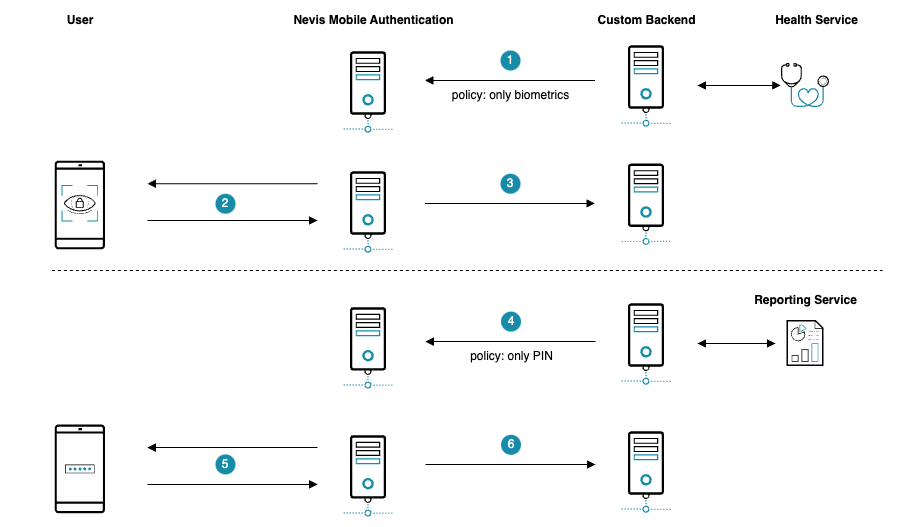
- Because the user wants to access health services, the custom backend starts an authentication and specifies the policy as being biometrics only.
- The Nevis Mobile Authentication backend restricts the authentication request sent to the client allowing only registered biometric authenticators to be used.
- The client is authenticated using his or her biometric credentials.
- Another request issued by the end user to access a reporting service requires PIN authentication, so the custom backend starts another authentication and specifies the policy as being PIN only this time.
- The Nevis Mobile Authentication backend restricts the authentication request sent to the client allowing only the registered PIN authenticator to be used.
- The client is authenticated using his or her PIN credential.
Technical Flow
The technical flow shows the dynamic policy selection, it omits the specific details concerning the complete authentication flow and focuses on the parts where the dynamic policies are involved. This for simplification reasons only, the same flow is applicable for any other operation as well.
The selection of the policy can be done in multiple ways:
- static as an auth state string property
- provided as an
inargsto the auth state which allows a previous auth state to set it as desired - provided as JSON input to the auth state
This example uses a script state to set the inargs to a specific policy.
@startuml

skinparam shadowing false
skinparam BoxPadding 10
skinparam sequence {
    ArrowColor #168CA9
    LifeLineBorderColor #047D82
    ParticipantBorderColor #168CA9
    ParticipantBackgroundColor #168CA9
    ParticipantFontName Frutiger
    ParticipantFontColor white
    ActorBackgroundColor #168CA9
    ActorBorderColor #168CA9
    ActorFontName Frutiger
    GroupBorderColor #168CA9
    GroupBorderThickness 1
    DividerBackgroundColor #168CA9
    DividerBorderColor #168CA9
    DividerBorderThickness 1
    DividerFontColor white
    DividerFontName Frutiger
    BoxBorderColor #168CA9
    BoxBackgroundColor #ECECEC
}
skinparam note {
    FontName Frutiger
    BorderColor #168CA9
    BackgroundColor #F5F5F5
}

title Dynamic Policy Selection


actor User as user

box "Mobile Device" #F5F5F5
 participant "FIDO UAF \n Authenticator" as authenticator #75C3D7
 participant "Nevis Access App" as app #75C3D7
end box

box "Nevis Backend"
    participant nevisProxy as proxy
    participant nevisAuth as auth
    participant nevisFIDO as fido
    participant nevisIDM as idm
end box

participant "Customer Application" as backend #75C3D7

== Initialise Authentication ==

proxy -> auth--++: Authentication required

autonumber

rnote over auth #ECECEC
  ScriptState
end note

auth -> auth: Determine the operation is of high risk,\n set ""inargs:policy"" to ""only-biometric-authenticators"".

rnote over auth #ECECEC
  FidoUafAuthState
end note

auth -> auth: ""fidoUafPolicy"" set to ""only-biometric-authenticators""

group HTTP API: Authentication Request Service
    auth -> fido++: ""GetUAFRequest""

    rnote right
    {
      "context" : "{
        "username":"jeff,
        "policy":"only-biometric-authenticators"
      }",
      "op" : "Auth"
    }
    end note

end group

hnote over fido
    policy <size:20><&document></size>
    restrictred to only
    allow biometric authenticators
end note
fido --> auth--: ""ReturnUAFRequest""\n(""AuthenticationRequest"")
autonumber stop
auth --> app--: Forward ""ReturnUAFRequest""\n(""AuthenticationRequest"")

== Client processing ==
autonumber resume

app -> app: Filter available authenticators based on server policy

autonumber stop

app -> authenticator++: Trigger user authentication
authenticator -> user++: Authenticate
user --> authenticator--: Unlock private key

hnote over authenticator
    private <size:20><color:red><&key></color></size>
end note
authenticator --> app--: Assertion

group HTTP API: Authentication Response Service
    app -> proxy++: ""SendUAFResponse""\n(""AuthenticationResponse"")
    proxy -> fido--++: Forward ""SendUAFResponse""\n(""AuthenticationResponse"")
end group

fido -> idm++: Fetch FIDO credential
idm --> fido--: Credential
hnote over fido
    public <size:20><color:green><&key></color></size>
    policy <size:20><&document></size>
    metadata <size:20><&document></size>
end note
fido --> app--: ""ServerResponse""

|||

@enduml
- After an authentication flow has been started, a ScriptState determines that the authentication operation requires a heightened security and sets the
inargs:policyvariable of theFidoUafAuthStatetoonly-biometric-authenticators. - The
FidoUafAuthStateevaluates thefidoUafPropertywhich has been set viainargsby the preceding auth state. - The
GetUafRequestsent by nevisAuth to nevisFido contains the selected policy as part of thecontextobject. - Based on the information provided in the
GetUafRequestcontext, nevisFIDO will use theonly-biometric-authenticatorspolicy file to construct theReturnUafRequestsent to the Access App. - The Access App filters the available authenticators the user registered beforehand based on the policy file and only returns biometric authenticators which can be used to perform the authentication.